Getting Started
Installation
pip install urdfgenpy
Or from source:
git clone https://github.com/svaibhav101/urdfgenpy
cd urdfgenpy
pip install -e ".[dev,docs]"
Minimal Example
Build a single revolute joint between two links and export to URDF.
The snippet below produces the same structure as the
PTU - 2-DOF example:
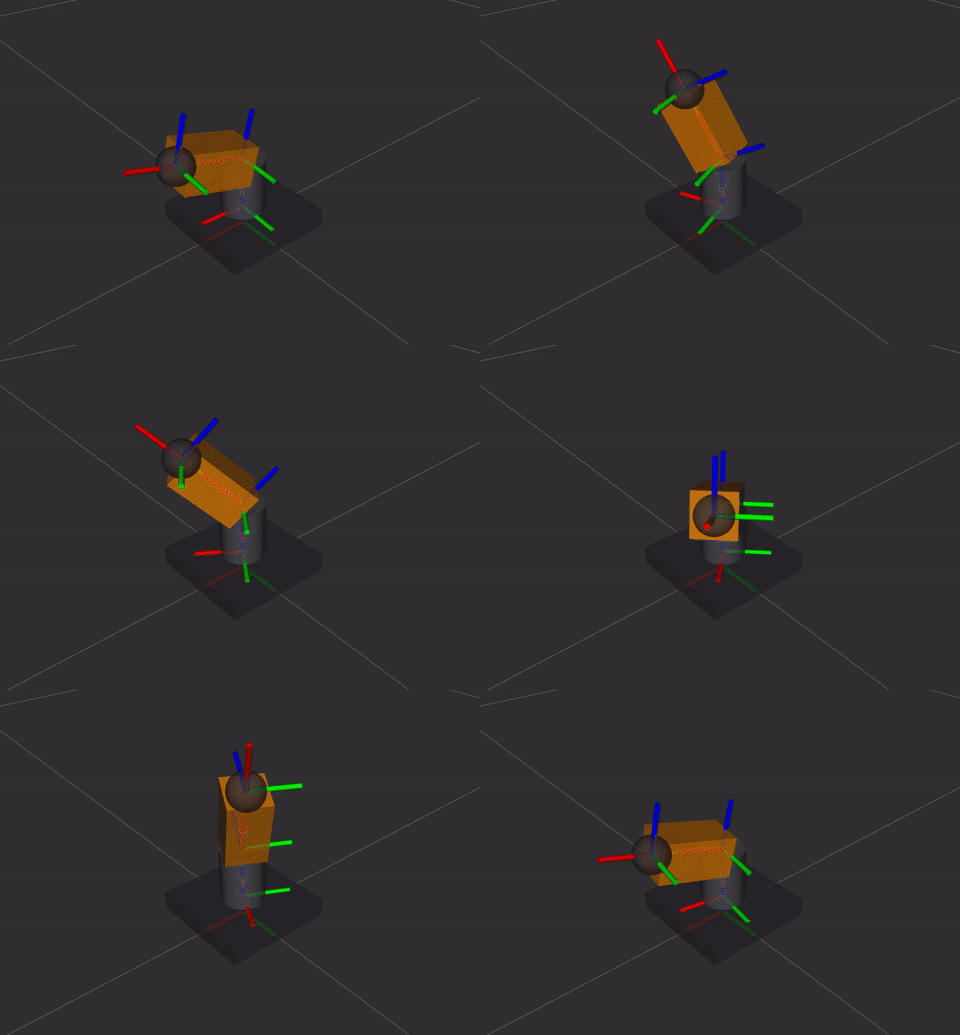
from urdfgenpy import (
    Box,
    Cylinder,
    Inertial,
    Joint,
    JointLimit,
    Link,
    Material,
    Origin,
    Robot,
    Visual,
)

charcoal = Material("charcoal", rgba=(0.22, 0.22, 0.25, 1.0))
amber    = Material("amber",    rgba=(1.0,  0.55, 0.0,  1.0))

# base plate
plate = Box(length=0.14, width=0.14, height=0.025)
base_plate = Link("base_plate")
base_plate.add_visual(Visual(geometry=plate, origin=Origin.above(plate), material=charcoal))
base_plate.set_inertial(Inertial.from_geometry(mass=0.8, geometry=plate))

# pan neck
neck = Cylinder(radius=0.028, length=0.07)
pan_link = Link("pan_link")
pan_link.add_visual(Visual(geometry=neck, origin=Origin.above(neck), material=charcoal))
pan_link.set_inertial(Inertial.from_geometry(mass=0.18, geometry=neck))

# sensor head
head = Box(length=0.09, width=0.05, height=0.05)
tilt_link = Link("tilt_link")
tilt_link.add_visual(Visual(geometry=head, origin=Origin(xyz=(0.045, 0, 0)), material=amber))
tilt_link.set_inertial(Inertial.from_geometry(mass=0.12, geometry=head))

robot = Robot("ptu")
robot.add_material(charcoal).add_material(amber)
robot.add_link(base_plate).add_link(pan_link).add_link(tilt_link)
robot.add_joint(Joint("pan_joint",  "revolute", "base_plate", "pan_link",
                        origin=Origin(xyz=(0, 0, 0.025)), axis=(0, 0, 1),
                        limit=JointLimit(-3.14, 3.14, effort=10, velocity=1.5)))
robot.add_joint(Joint("tilt_joint", "revolute", "pan_link",   "tilt_link",
                        origin=Origin(xyz=(0, 0, 0.07)),   axis=(0, 1, 0),
                        limit=JointLimit(-0.52, 1.57, effort=6,  velocity=1.5)))
robot.save("ptu.urdf")
robot.print_tree()
Geometry Helpers
Origin.above(geometry)
Lifts a geometry so its bottom face sits at z = 0:
box    = Box(0.2, 0.2, 0.1)  # length(x), width(y), height(z)
origin = Origin.above(box)   # xyz = (0, 0, 0.05)

cyl    = Cylinder(0.05, 0.3) # radius, length
origin = Origin.above(cyl)   # xyz = (0, 0, 0.15)

sphere = Sphere(0.1)           # radius
origin = Origin.above(sphere)  # xyz = (0, 0, 0.05)
Origin.wheel()
Returns an origin with −pi/2 roll so a URDF cylinder acts as a wheel (cylinder Z-axis -> wheel rotation axis ->Y):
wheel_origin = Origin.wheel(xy=(-0.15, 0.0), z=0.05)
Automatic Inertia
# From a specific shape
inertial = Inertial.from_box(mass=1.0, length=0.2, w=0.2, h=0.1)
inertial = Inertial.from_cylinder(mass=0.5, radius=0.05, length=0.2)
inertial = Inertial.from_sphere(mass=0.1, radius=0.03)

# Auto-dispatch from any geometry object
box     = Box(0.2, 0.2, 0.1)
inertial = Inertial.from_geometry(mass=1.0, geometry=box)
Kinematic Tree Visualisation
robot.print_tree()    # coloured ASCII to stdout
text = robot.tree_string()   # plain-text version
robot.save_tree("tree.txt")  # write to file
Exporting
# To string
urdf_xml  = robot.to_urdf()
xacro_xml = robot.to_xacro()

# Directly to file
robot.to_urdf("output.urdf")
robot.to_xacro("output.xacro")

# Auto-detect from extension
robot.save("output.urdf")   # writes URDF
robot.save("output.xacro")  # writes Xacro
What’s Next?
API Reference - full documentation for every public class and method, including
Robot,Link,Joint, geometry primitives, and exporters.Development Guide - set up a local environment, run tests, and open a pull request.
Roadmap - planned features: DH-parameter import, URDF round-trip parsing, SDF export, sensor elements, and more.